
Adventures in Data Profiling (Part 1)
Jim Harris in
Data Quality,
Methodology tagged
Adventure in Data Profiling,
Data Profiling
Monday, August 3, 2009 at 3:41PM In my popular post Getting Your Data Freq On, I explained that understanding your data is essential to using it effectively and improving its quality – and to achieve these goals, there is simply no substitute for data analysis.
I explained the benefits of using a data profiling tool to help automate some of the grunt work, but that you need to perform the actual analysis and then prepare meaningful questions and reports to share with the rest of your team.
Series Overview
This post is the beginning of a vendor-neutral series on the methodology of data profiling.
In order to narrow the scope of the series, the scenario used will be that a customer data source for a new data quality initiative has been made available to an external consultant who has no prior knowledge of the data or its expected characteristics. Also, the business requirements have not yet been documented, and the subject matter experts are not currently available.
The series will not attempt to cover every possible feature of a data profiling tool or even every possible use of the features that are covered. Both the data profiling tool and the data used throughout the series will be fictional. The “screen shots” have been customized to illustrate concepts and are not modeled after any particular data profiling tool.
The Adventures Begin...
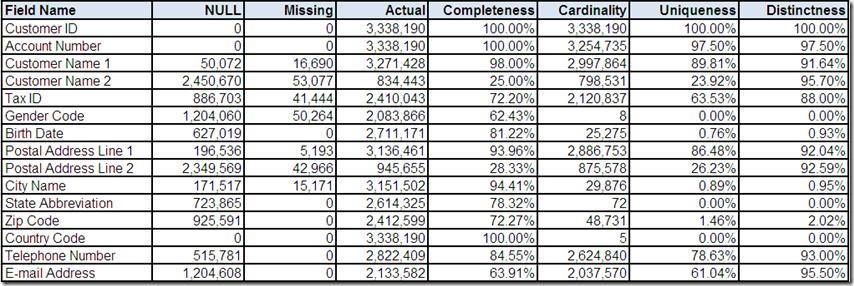
The customer data source has been processed by a data profiling tool, which has provided the above counts and percentages that summarize the following field content characteristics:
- NULL – count of the number of records with a NULL value
- Missing – count of the number of records with a missing value (i.e. non-NULL absence of data e.g. character spaces)
- Actual – count of the number of records with an actual value (i.e. non-NULL and non-missing)
- Completeness – percentage calculated as Actual divided by the total number of records
- Cardinality – count of the number of distinct actual values
- Uniqueness – percentage calculated as Cardinality divided by the total number of records
- Distinctness – percentage calculated as Cardinality divided by Actual
Some initial questions based on your analysis of these statistical summaries might include the following:
- Is Customer ID the primary key for this data source?
- Is Customer Name 1 the primary name on the account? If so, why isn't it always populated?
- Do the statistics for Account Number and/or Tax ID indicate the presence of potential duplicate records?
- Why does the Gender Code field have 8 distinct values?
- Do the 5 distinct values in Country Code indicate international postal addresses?
Please remember the series scenario – You are an external consultant with no prior knowledge of the data or its expected characteristics, who is performing this analysis without the aid of either business requirements or subject matter experts.
What other questions can you think of based on analyzing the statistical summaries provided by the data profiling tool?
In Part 2 of this series: We will continue the adventures by attempting to answer these questions (and more) by beginning our analysis of the frequency distributions of the unique values and formats found within the fields. Additionally, we will begin using drill-down analysis in order to perform a more detailed review of records of interest.
Related Posts
Adventures in Data Profiling (Part 2)
Adventures in Data Profiling (Part 3)
Adventures in Data Profiling (Part 4)
Adventures in Data Profiling (Part 5)
Adventures in Data Profiling (Part 6)
Adventures in Data Profiling (Part 7)

Reader Comments (8)
On Twitter, Henrik Liliendahl Sørensen commented:
“'ZIP Code' and 'Tax ID' are United States (US) specific field labels”
And I responded by asking:
Does that guarantee that the field values will be?
And Henrik tweeted back:
“Absolutely not. P.S.: Even Omikron uses 'ZIP Code' in the English version :-( ”
My final un-tweeted commentary:
Verifying data matches the metadata that describes it is one essential analytical task that data profiling can help us with, providing a much needed reality check for the perceptions and assumptions that we may have about our data.
Nice job, however I would like to suggest in addition to basic counts and percentages and since you or the tool had to scan the entire file to get you results you may also want to include a few additional results of the scan such as domain values (Min, Max, Mode(most popular value)) and their respective counts plus the patterns (email ZZZ@ZZZ.ZZ, telephone 9-999-999-9999 etc...) and column metadata (max length, min length, datatype).
This may seem excessive, however for large data sets the scan is expensive and you want to get as much out of it as you can.
Thanks for your feedback Ira,
I do not think that anything you have suggested is excessive.
I completely agree with you that data profiling (especially with large data sets) can be very expensive in terms of processing time and therefore you want to get as much out of that investment as you can. In fact, this is the very “grunt work” that data profiling tools automate for you and is one of the primary benefits for using one.
You can assume that all of the results shown throughout the series have been produced by the initial processing of the data source by the data profiling tool.
Some of the additional and extremely useful information that you have described will in fact be included in subsequent parts in the series. However, some of it will not be included only because, as I explained in the overview, I will not be attempting to cover every possible feature of a data profiling tool – mainly because I don’t want the series to be too long – currently I am planning on 5 parts.
Best Regards…
Jim
Nice article Jim. I am looking forward to all five parts...how often do you plan to post them?
In addition to the points made by Ira, some of the questions which came to my mind were as follows (based on the stats above):
1. What is the mode in which this organization communicates/touches its customers? Looks like significant customers are missing some information: Not all have telephone numbers, not all have e-mails, not all have address etc...is it important to touch/communicate with customers?
2. What is customer name 1 and customer name 2? Why there are two names captured and how they are used?
3. I would definitely like to know usage of following fields. Since none of these fields have values 100% of the time but these have a high Actual count it makes me feel that these fields were captured with some intent (and I want to know that intent):
- Birth Date
- Gender Code
- Telephone Number
- E-mail
Vish Agashe
Thanks for your feedback and questions Vish – both are greatly appreciated.
I plan to post 2 parts per week. However, I might stretch it out a little on a few of the parts because I want to leave enough time between posts to allow for comments. This is one of the primary reasons that I am doing the series via a blog and not a whitepaper or a presentation. I feel that the dialogue and discussion greatly improve the content and allow some of my points to be made for me by those who take the time to comment as opposed to me just telling everyone how I see the world.
All of your questions are excellent. I could answer them all right now but it would defeat the goal of the series.
Remember the scenario – we are pretending to be an external consultant with no prior knowledge of the data or its expected characteristics – obviously this is far easier for you and the rest of my readers since you truly don’t have any knowledge of the data that I am using.
Many of your questions would need to be posed to those writing the business requirements or the subject matter experts for this data source. But again, in the series scenario, we do not have access to any of these resources.
Therefore, what the series is really asking is: What can just our analysis of the data tell us about it?
Data profiling at this stage of the process is often more about formulating a growing list of meaningful questions than about finding answers on our own. I would argue that this is not a waste of our time and in fact, is a necessary aspect of performing comprehensive data analysis.
I have been on many projects where I was told that I should delay data profiling until business requirements and subject matter experts are available.
I always disagree because I think that I can do a better job of evaluating the business requirements and preparing for my meetings with subject matter experts when I have spent some time looking at the data from a starting point of blissful ignorance and curiosity.
So not to be evasive, I can only say that we may be able to answer some of your questions by the end of the series – but we may also not be able to answer some of them.
At the very least, we will have a strong working theory before we engage the rest of team.
Best Regards…
Jim
Additional questions:
- Why are there 72 distinct values for State Abbreviation?
- Does this indicate data quality problems? Non-US addresses? Misnamed column? Overloading?
- What values are found in State Abbreviation?
Jim,
Thanks for the article, looking forward to the rest :-)
My question would be about the treatment of the data BEFORE it gets to you.
For example, has Birth Date already been validated by the front-end system thereby rendering invalid dates as null. Hence the figure we see is not 100% complete but yet none are missing?
Thanks for the additional questions Toby and Phil,
Good eye for detail, Toby. I agree that something potentially odd seems to be happening in our State Abbreviation field. An upcoming part in the series will be drilling down to those 72 distinct values and hopefully we will be able to answer all of your great questions. Stay tuned.
Great question Phil – front-end validation (or some other upstream process before data reaches wherever we happen to be in the data’s chain of custody) that replaces invalid values with NULL is a common approach to “cleansing” data.
However, as Bill Inmon recently discussed in his B-eye-Network article Some Perspectives on Quality : “…keeping incorrect data even when it is known to be incorrect often provides valuable clues as to how data needs to be corrected.”
Therefore, even when substituting NULL for invalid values is the business rule that gets implemented, I advocate at least tracking what the invalid value was for both auditing purposes and for sending an upstream request to prevent it from happening or otherwise resolve the issue before it becomes a downstream problem.
However, as Bill Inmon’s article also points out, there are multiple perspectives on what the best approach is and, as with so many other data issues, there is no one “right” answer.
As for the series, within the context of the scenario, we wouldn’t know but I will break my own rules (just a little) and tell you that no pre-cleansing has occurred on any of the fields in our data source.
However, that doesn’t mean that all is necessarily well with the Birth Date field :-)
Best Regards…
Jim